Monday, May 17, 2010

Quiz 11 - Counting toward zero

Please read this quiz requirement on Special Project 2: http://jstutor.yolasite.com/s2.php
This quiz 11 contains both the count up and count down toward zero, the whole Special Assignment 2.

Quiz 10 - Counting down to zero

Please read this quiz requirement on Special Project 2: http://jstutor.yolasite.com/s2.php
This quiz 10 is the first part of the Special Assignment 2, you need only to have the counting down part of the code.

Wednesday, May 12, 2010

Quiz 9 Counting down seconds and due at non-zero second

Please read this quiz requirement on Special Project 1: http://jstutor.yolasite.com/s1.php
Unlike the Quiz 8, you need to pick a non-zero DUE SECOND, i.e. 1 - 59:

Monday, May 10, 2010

Quiz 8 - Counting Down Secnds

Please read this quiz requirement on Special Project 1: http://jstutor.yolasite.com/s1.php

Thursday, May 6, 2010

Extra Credit 7 - Javascript, Skip Counting

LABAR Extra Credit Project 7

This Extra Credit assignment 7, is an extended opportunity for creating a JavaScript function to skip counting, i.e. not to display, the odd numbers, based on the quiz 11. This project is to be done during your one hour lab by arrangement (LABAR).
The functionality of this assignment should perform:

  1. counting down positive integer number, if the number is greater than 10 start the count down from 10;
  2. counting up the negative integer number, if the number is less than -10 start the count up from -10;
  3. skip the odd number;
  4. stop the counting when zero is reached;
  5. do nothing if the entered number is not a positive or negative interger number.
The following is the finished example::


The following sample code performs:
  1. counting down positive integer number;
  2. skip (does not display) the odd number;
  3. stop the counting when zero is reached;
  4. do nothing if the entered number is not a positive interger number.


You are expected to complete the assignment based on the above working code.

Extra Credit 6 - HTML Form

LABAR Extra Credit Project 6
This Extra Credit assignment 6, is an extended opportunity for aligning an HTML form to a center line. It is a a common pratice to arrange the forom of two columns to be center aligned like the following example form. This project is to be done during your one hour lab by arrangement (LABAR).

In this assignment, you are to create an HTML form that contains the following 7 fields:
Title, Name, Home Address, Work Address, Home Phone, Work Phone, and Email Address.


This extra credit assignment to align the HTML Form to the center line like the following example:

Title:

Name:

Home Address:

Here is the above sample code:


Tuesday, May 4, 2010

Javascript Tutorial 1 - Introduction

JavaScript Tutorial

« DVC COMSC-100 Home Next Chapter »

JavaScript
JavaScript is THE scripting language of the Web.
JavaScript is used in millions of Web pages to add functionality, validate forms, detect browsers, and much more.

Examples in Each Chapter

This JavaScript tutorial contains interactive examples in each chapter!
With our online editor, you can edit the JavaScript code, and click on a button to view the result.


After edit the code below, then click to see the result.
Result:
Designed for DVC Comsc-100 1242/8263

Monday, May 3, 2010

Quiz 6 Flowchart to Javascript

The following numbered flowchart diagrams are to be transcribed into javascript in the corresponding answer fields:
 Example:

1


2


3


4


5


For quiz result please click this link: http://spreadsheets.google.com/pub?key=ti-VP5NIWjONodMfgwaQBbQ&output=html

Saturday, April 24, 2010

Assignment 14 - Simple Calculator

LABAR Project 14
This assignment is to be done during your one hour lab by arrangement (LABAR). This assignment requires you to write your first javascript to declare, assign and display three variables of the string, number, and boolean types respectively.
In this assignment, Assignment #14, you are to create a simple calculator as in the HTML Form below. This calculator can:
  • provide the add, substract, multiply, divide, and clear javascript functions;
  • provide two HTML text inputs for user to enter the two operaand numbers;
  • provide a HTML text input for the onClick triggered math function to place the result (number);
  • when one of the math operator button, one of the + - * / buttons, is pressed, i.e. onClick event, the corresponding math function shall place the result in the Answer text Input;
  • when the Clear button, the "C" button, is pressed, i.e. onClick event, all text Input fields shall be cleared.

Enter a number:
Enter a number:

Answer =

The above html form code is listed below:


Sample Code:
Javascript Adder


Try this adder out!

Simple Adder
Enter a number:
Enter a number:


Answer =

Assignment 13 - Simple Adder

LABAR Project 13
This assignment is to be done during your one hour lab by arrangement (LABAR). This assignment requires you to write your first javascript to declare, assign and display three variables of the string, number, and boolean types respectively.
In this assignment, Assignment #13, you are to create a simple addition only calculator as in the HTML Form below. This calculator can:
  • provide the addition and clear javascript functions;
  • provide two HTML text inputs for user to enter the two operaand numbers for addition function;
  • provide a HTML text input for the onClick triggered math function to place the result (number);
  • when add (+) operator button is pressed, i.e. the onClick event, the corresponding addition javascript function shall place the result in the Answer text Input;
  • when the Clear "C" button is pressed, i.e. the onClick event, all text Input fields shall be cleared.

Enter a number:
Enter a number:

Answer =

The above html form code is listed below:


Sample Code:
Javascript Adder


Try this adder out!

Simple Adder
Enter a number:
Enter a number:


Answer =

Assignment 12 - - Connecting with the Form, Number Shifter

LABAR Assignment 12  Number Shifting Form
This Assignment 12 - number shifting form, to be done during your one hour lab by arrangement (LABAR). You are required to familiar with connecting the html form with the javascript function. Two functions are called from the onClick of the submit input in the form:
  • A number shift down << function, decreasing (subtracting) the number by 1;
  • A number shift up >> function, increasing (adding) the number by 1;
The finished project should look like the following:

Number Shifter


The above form uses a system built-in variable "this", a self pointer to the object in reference. The usage of "this" object is commonly used in all object oriented programming, including javascript.  You are to use the "this" pointer to point to the passing parameters as shown in the example below. Also, in this assignment the number is default to 0, you may enter any number, the form still works.

In the following example, only the shift up function are shown. You are to write the shift down function and connect the function to the form to complete this assignment.
 
Please submit your javascript work in .html file through webCT-assignment.
Note: The following code is for reference only. You submission will be disgarded and NO points will be awarded, if  any of the submitted code  resembles the following example:


Simple Shifter


Example

Assignment 11 - Connecting with the form, Check Browser Type

LABAR Assignment 11  Check Browser Type Form
This Assignment 11 - Check Browser Type form, to be done during your one hour lab by arrangement (LABAR). You are required to familiar with connecting the html form with the javascript function. The value of a system built-in variable, navigator.appName, is returned to the onClick event of the submit input in the form:
The finished project should look like the following:

Find the browser type

1 - Microsfot Internet Explorer
2 - Netscape (Firefox)
3 - Others


The onClick event of the form uses a system built-in variable navigator.appName. The usage of this variable are shown in the example below.


The example has the necessary code for you to complete the assignment11. From the example, you shall change the findBrowser(input) function, to test on the returned string value from navigator.appName system built-in variable.

In order to display a value, for example "1", onto the Form Input Field, simply assign the value to the input.value variable inside the findBrowser() function:
input.value = 1;
The following numbers are defined (for input.value variable):
1 - Microsfot Internet Explorer
2 - Netscape (Firefox)
3 - Other types of browsers

Here is the flowchart for the above logic:


Please submit your javascript work in .html file through webCT-assignment.
Note: The following code is for reference only. You submission will be disgarded and NO points will be awarded, if  any of the submitted code  resembles the following example:

Example

Find the browser type


Friday, April 23, 2010

Extra Credit 5 - Flowchart to JavaScript Again

LABAR Extra Credit Project 5
This Extra Credit assignment 5, is an extended opportunity for assignment 8 flowchart to javascript, to be done during your one hour lab by arrangement (LABAR).

For our class assignments on javascript this semester, we are only using the IF, IF-ELSE, and While control blocks. Please translate the following two compound control flowcharts to a proper javascript. Please enclose two files when submitting this assignment.

1. Translate the flowchart on the right.
    Hint: (The one on the left is the outer loop)

drawing3

2. Translate the flowchart on the right.
   
Hint: (The one on the left is the outer loop)
drawing3


The following examples are for your reference.
Examples: This flowcharts are translated as a corresponding executable javascript:

IF Control Block

drawing1

var x=12;  // to have the correct syntax 
if(x>1) {
x=x-1;
document.write(x);
}


While Control Block

drawing1
var x=12;  // to have the correct syntax 
if(x>1) {
x=x-1;
document.write(x);
}


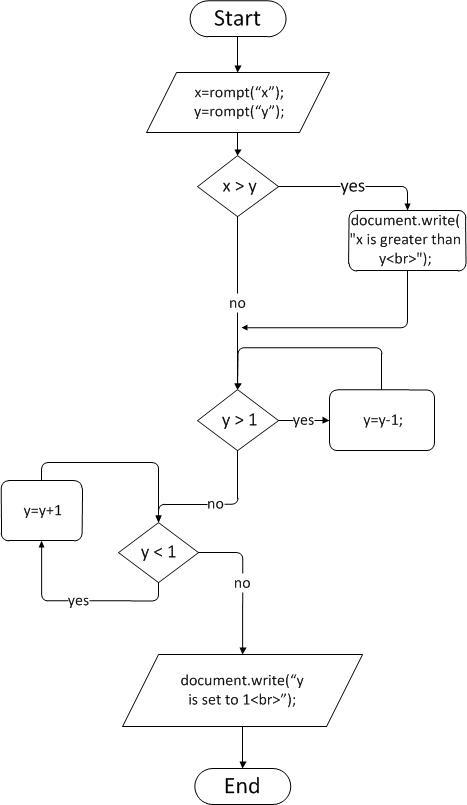
Additional example from previous Extra Credit Assignments:

EC3 Flowchart


drawing1
<script typ="text/javascript">

// make sure the flowchart translation
// has the proper javascript syntax

var x, y;
x=prompt("enter x",10);
y=prompt("enter y", 8)

// 1st control block
if(x>y){document.write("x is greater than y");}


// 2nd control block
while(y>1){ y=y-1;}


// 3rd control block
while(y<1){ y=y+1;}

// outputing the message before termination
document.write("y is set to: ",y);
</script>


EC4 Flowchart


drawing1
<script typ="text/javascript">
// make sure the flowchart translation
// has the proper javascript syntax

var x,y;
x=parseInt(prompt("enter X","1"));
document.write("X start as ",x,"<br>");
y=parseInt(prompt("enter Y","1"));
document.write("Y start as ",y,"<br>");

// begining of the outer WHILE loop
while(y<1){
    // begining of the inner WHILE loop
    while(x>1){
        x=x-1;
        document.write("X is: ",x,"<br>");
    }// end of the inner WHILE loop
    y=y+1;
   
document.write("Y is: ",y,"<br>");
    x=5;
}
// end of the inner WHILE loop

// beigining of the IF control
if(x==1){document.write("x is already 1<br>");}
else {x=1;}
// end of the IF control

document.write("x and y are set to 1 in all cases <br>");
</script>

In the EC4 flowchart, if the entered Y value is greater than one, the execution will fall through outer (and inner) While loop. Please test the case with the y is positive number and then negative number.

Extra Credit 4 - Flowchart to javascript - Compound Blocks

LABAR
Extra Credit Project 4
This Extra Credit assignment 4, is the part 2 of the extended (assignment 8) flowchart to javascript, is to be done during your one hour lab by arrangement (LABAR). This javascript assignment requires you translate the following flowchart to a valid excutable javascript: 


Example Flowchart
An example flowchart (the top portion of the assignment flowchart) is translated below:


Example javascript Translation

Please submit your javascript work in .html file through webCT-assignment.

Thursday, April 22, 2010

Extra Credit 3 - Flowchart to javascript part 1

LABAR
Extra Credit Project 3
This Extra Credit assignment 3, is the part 1 of the extended (assignment 8) flowchart to javascript, is to be done during your one hour lab by arrangement (LABAR). This javascript assignment requires you to familiar with the translation from flowchart to javascript. The flowchart is made of a set of code blocks that are connected through the execution flow (arrow) connectors, where:
  • A simple block is a collection of symbols with no decision symbol.
  • A basic block is a collection of symbols with one decision symbol.
  • A complex block is a collection of symbols with two or more decision symbols.
  • A compound block is a block containing another block.
Here is an illustration of blocks and the basic if, if-else, and while blocks' coresponding javascripts.


Here is the flowchart that you are to translate to javascript:


Example Flowchart
An example flowchart (the top portion of the assignment flowchart) is translated below:


Example javascript Translation


Please submit your
javascript work in .html file through webCT-assignment.


Wednesday, April 14, 2010

Assignment 8 - Flowchart to javascript

LABAR Project 8
This assignment is to be done during your one hour lab by arrangement (LABAR). This assignment requires you to create a javascript from a flowchart. This assignment is to ensure that you learn how to better write javascript through the flowchart, especially the flow control.

The difficulty of of this project has been reduced. Two additional mini-steps has been added: Extra Credit 3 and 4. It is not required for you to do EC-3 and 4, however, it would be easier for you to work on this assignment, after the EC3 and EC4 .

Unlike the EC4, a while loop inside of a while loop, the Assignment 8 has an if decision block inside of a while loop.

The following code can be used for the javascript inside of the while loop:


Extra Credit 2 - Number and Logical Variable

LABAR
Extra Credit Project 2
This Extra Credit assignment 2, part 2 of the Variable, (on page
3 of PL's note),
is to be done during your one hour lab by arrangement (LABAR). This javascript assignment requires you to familiar with the number and logical variable.

You are to work with the number and logical variables in the following 5 steps:
  • Frist Step: declare a number variables, and assign an initial value.
  • Next Step: change the number variable value.
  • Then, input from user a new number value to another number variable.
  • Then, combine the input value with the existing number variable.
  • Last Step, print out (document.write) the number value if the value is greater than 1000, otherwise print the text "the value is less than 1000".
You have to print out, using the document.write, the value of the string value of all the above 5 steps.


Please submit your javascript work in .html file through webCT-assignment.
Note: The following envelope HTML code has to be included for the
.html file in order for your javascript to execute correctly:


Example

Extra Credit 1 - String Variable

LABAR
Extra Credit Project 1
This Extra Credit assignment 1, part 1 of the Variable, (on page
3 of PL's note),
is to be done during your one hour lab by arrangement (LABAR). This javascript assignment requires you to familiar with the string variable.

You are to work with the string variables in the following 4 steps:
  • Frist Step: declare a string variables, and assign an initial value.
  • Next Step: change the string variable value.
  • Then, input from user a new value to another string variable.
  • Last Step, combine the input value with the existing variable value.
You have to print out, using the document.write, the value of the string value of all the above 4 steps.


Please submit your javascript work in .html file through webCT-assignment.
Note: The following envelope HTML code has to be included for the
.html file in order for your javascript to execute correctly:


Example
 

comsc-100 Copyright © 2009 Gadget Blog is Designed by Ipietoon Sponsored by Online Business Journal